<?xml version="1.0" encoding="utf-8"?><feed xmlns="http://www.w3.org/2005/Atom" ><generator uri="https://jekyllrb.com/" version="3.10.0">Jekyll</generator><link href="https://krishnamohan-seelam.github.io/mongodb-vectorsearch/feed.xml" rel="self" type="application/atom+xml" /><link href="https://krishnamohan-seelam.github.io/mongodb-vectorsearch/" rel="alternate" type="text/html" /><updated>2026-05-07T03:30:19+00:00</updated><id>https://krishnamohan-seelam.github.io/mongodb-vectorsearch/feed.xml</id><title type="html">MongoDB Vector Search</title><subtitle>A comprehensive guide to MongoDB Vector Search</subtitle><entry><title type="html">Creating Vector Search Queries in MongoDB Atlas</title><link href="https://krishnamohan-seelam.github.io/mongodb-vectorsearch/mongodb/python/vector-search/2026/05/03/MongoDB_VectorSearch_Query_Tutorial.html" rel="alternate" type="text/html" title="Creating Vector Search Queries in MongoDB Atlas" /><published>2026-05-03T00:00:00+00:00</published><updated>2026-05-03T00:00:00+00:00</updated><id>https://krishnamohan-seelam.github.io/mongodb-vectorsearch/mongodb/python/vector-search/2026/05/03/MongoDB_VectorSearch_Query_Tutorial</id><content type="html" xml:base="https://krishnamohan-seelam.github.io/mongodb-vectorsearch/mongodb/python/vector-search/2026/05/03/MongoDB_VectorSearch_Query_Tutorial.html"><![CDATA[<h1 id="introduction-to--vector-search-queries-in-mongodb-atlas">Introduction to  Vector Search Queries in MongoDB Atlas</h1>

<p><img src="/assets/mongodb_vector_search.png" alt="mongodb_vector_search" /></p>

<h2 id="overview">Overview</h2>

<p>This tutorial walks you through the complete workflow of performing <strong>vector search</strong> in MongoDB Atlas — from generating text embeddings to constructing aggregation pipelines with and without pre-filters.</p>

<p>Vector search enables <strong>semantic similarity</strong> queries: instead of matching exact keywords, you find documents whose <em>meaning</em> is closest to your query. This is the engine behind modern AI features like RAG (Retrieval-Augmented Generation), recommendation systems, and intelligent document search.</p>

<hr />

<h2 id="prerequisites">Prerequisites</h2>

<ul>
  <li>A running <strong>MongoDB Atlas</strong> cluster (A MongoDB Atlas cluster M0 tier (free) should be sufficient)</li>
  <li>A collection with documents that have an embedding field (e.g., <code class="language-plaintext highlighter-rouge">plot_embedding</code>)</li>
  <li>A <strong>Vector Search index</strong> already created on the collection (see the <a href="#step-1-create-a-vector-search-index">Index Setup section</a> below)</li>
  <li>An API key for <strong>Voyage AI</strong> (or another embedding provider)</li>
  <li>Python environment with <code class="language-plaintext highlighter-rouge">pymongo</code> and <code class="language-plaintext highlighter-rouge">voyageai</code> packages installed</li>
</ul>

<hr />

<h2 id="table-of-contents">Table of Contents</h2>

<ol>
  <li><a href="#what-is-a-vector-embedding">What is a Vector Embedding?</a></li>
  <li><a href="#step-1--embedding-model-voyage-ai-voyage-35-lite">Step 1 — Embedding Model: Voyage AI voyage-3.5-lite</a></li>
  <li><a href="#step-2--generate-and-store-document-embeddings">Step 2 — Generate and Store Document Embeddings</a></li>
  <li><a href="#step-3--create-a-vector-search-index">Step 3 — Create a Vector Search Index</a></li>
  <li><a href="#step-4--generate-a-query-embedding">Step 4 — Generate a Query Embedding</a></li>
  <li><a href="#step-5--build-the-vector-search-pipeline">Step 5 — Build the Vector Search Pipeline</a></li>
  <li><a href="#step-6--vector-search-with-a-pre-filter">Step 6 — Vector Search with a Pre-Filter</a></li>
  <li><a href="#deep-dive-how-hnsw-powers-vector-search">Deep Dive: How HNSW Powers Vector Search</a></li>
  <li><a href="#tuning-numcandidates-for-optimal-performance">Tuning numCandidates for Optimal Performance</a></li>
  <li><a href="#ann-vs-exact-search">ANN vs. Exact Search</a></li>
  <li><a href="#understanding-vectorsearchscore">Understanding vectorSearchScore</a></li>
  <li><a href="#common-pitfalls">Common Pitfalls</a></li>
  <li><a href="#quick-reference">Quick Reference</a></li>
</ol>

<hr />

<h2 id="what-is-a-vector-embedding">What is a Vector Embedding?</h2>

<p>A <strong>vector embedding</strong> is a dense numerical representation of text (or other data) in a high-dimensional space. Semantically similar texts are placed closer together in this space.</p>

<div class="language-plaintext highlighter-rouge"><div class="highlight"><pre class="highlight"><code>"A dog running in the park"    → [0.12, -0.45, 0.87, ..., 0.03]   (1024 numbers)
"A puppy playing outdoors"     → [0.13, -0.43, 0.89, ..., 0.02]   ← very similar!
"The stock market crashed"     → [-0.91, 0.22, -0.54, ..., 0.77]  ← very different
</code></pre></div></div>

<p><strong>Similarity is measured using distance metrics:</strong></p>

<table>
  <thead>
    <tr>
      <th>Metric</th>
      <th>Formula</th>
      <th>Best For</th>
    </tr>
  </thead>
  <tbody>
    <tr>
      <td><strong>Cosine</strong></td>
      <td>$1 - (A·B / |A||B|)$</td>
      <td>Text similarity (most common)</td>
    </tr>
    <tr>
      <td><strong>Dot Product</strong></td>
      <td>$A·B$</td>
      <td>Normalized vectors, fast ranking</td>
    </tr>
    <tr>
      <td><strong>Euclidean</strong></td>
      <td>$\sqrt{\sum(A_i - B_i)^2}$</td>
      <td>When magnitude matters</td>
    </tr>
  </tbody>
</table>

<blockquote>
  <p><strong>Source:</strong> <a href="https://www.mongodb.com/docs/atlas/atlas-vector-search/vector-search-stage/">MongoDB Atlas Vector Search Documentation</a></p>
</blockquote>

<hr />

<h2 id="step-1--embedding-model-voyage-ai-voyage-35-lite">Step 1 — Embedding Model: Voyage AI voyage-3.5-lite</h2>

<p>The examples in this tutorial use the <strong><code class="language-plaintext highlighter-rouge">voyage-3.5-lite</code></strong> embedding model from Voyage AI — a state-of-the-art, cost-efficient model optimized for large-scale retrieval and RAG applications.</p>

<h3 id="key-specifications">Key Specifications</h3>

<table>
  <thead>
    <tr>
      <th>Property</th>
      <th>Value</th>
    </tr>
  </thead>
  <tbody>
    <tr>
      <td><strong>Supported Dimensions</strong></td>
      <td>2048, 1024 (default), 512, 256</td>
    </tr>
    <tr>
      <td><strong>Context Length</strong></td>
      <td>32,000 tokens</td>
    </tr>
    <tr>
      <td><strong>Quantization Types</strong></td>
      <td><code class="language-plaintext highlighter-rouge">float</code> (default), <code class="language-plaintext highlighter-rouge">int8</code>, <code class="language-plaintext highlighter-rouge">uint8</code>, <code class="language-plaintext highlighter-rouge">binary</code>, <code class="language-plaintext highlighter-rouge">ubinary</code></td>
    </tr>
    <tr>
      <td><strong>Use Cases</strong></td>
      <td>Technical docs, code, law, finance, web reviews, conversations</td>
    </tr>
  </tbody>
</table>

<h3 id="why-flexible-dimensions">Why Flexible Dimensions?</h3>

<p><code class="language-plaintext highlighter-rouge">voyage-3.5-lite</code> uses <strong>Matryoshka Representation Learning (MRL)</strong> — a technique where the first <code class="language-plaintext highlighter-rouge">N</code> dimensions of a larger embedding already form a high-quality, lower-dimensional embedding. This means you can truncate the vector to save storage without dramatically hurting recall quality.</p>

<div class="language-plaintext highlighter-rouge"><div class="highlight"><pre class="highlight"><code>2048-dim  →  high quality, high storage cost
1024-dim  →  balanced (default)
512-dim   →  compact, good for memory-constrained deployments
256-dim   →  smallest, fastest, some quality trade-off
</code></pre></div></div>

<h3 id="quantization-tradeoffs">Quantization Tradeoffs</h3>

<p>Quantization reduces the precision of each floating-point number:</p>

<table>
  <thead>
    <tr>
      <th>Type</th>
      <th>Storage Reduction</th>
      <th>Recall Impact</th>
    </tr>
  </thead>
  <tbody>
    <tr>
      <td><code class="language-plaintext highlighter-rouge">float</code></td>
      <td>Baseline</td>
      <td>None (highest quality)</td>
    </tr>
    <tr>
      <td><code class="language-plaintext highlighter-rouge">int8</code></td>
      <td>~75% reduction</td>
      <td>Minimal</td>
    </tr>
    <tr>
      <td><code class="language-plaintext highlighter-rouge">binary</code></td>
      <td>~97% reduction</td>
      <td>Moderate — use with binary rescoring</td>
    </tr>
  </tbody>
</table>

<blockquote>
  <p><strong>Tip:</strong> Using <code class="language-plaintext highlighter-rouge">int8</code> at 2048 dimensions can reduce vector DB costs by ~83% vs. standard float embeddings, per Voyage AI documentation.</p>
</blockquote>

<hr />

<h2 id="step-2--generate-and-store-document-embeddings">Step 2 — Generate and Store Document Embeddings</h2>

<p>Before you can run vector search queries, each document in your collection must have an <strong>embedding field</strong> that stores the vector.</p>

<h3 id="installation">Installation</h3>

<div class="language-bash highlighter-rouge"><div class="highlight"><pre class="highlight"><code>pip <span class="nb">install </span>voyageai pymongo
</code></pre></div></div>

<h3 id="generating-embeddings-for-documents">Generating Embeddings for Documents</h3>

<div class="language-python highlighter-rouge"><div class="highlight"><pre class="highlight"><code><span class="kn">import</span> <span class="nn">voyageai</span>
<span class="kn">from</span> <span class="nn">pymongo</span> <span class="kn">import</span> <span class="n">MongoClient</span>

<span class="c1"># --- Setup ---
</span><span class="n">vo</span> <span class="o">=</span> <span class="n">voyageai</span><span class="p">.</span><span class="n">Client</span><span class="p">(</span><span class="n">api_key</span><span class="o">=</span><span class="s">"YOUR_VOYAGE_API_KEY"</span><span class="p">)</span>
<span class="n">client</span> <span class="o">=</span> <span class="n">MongoClient</span><span class="p">(</span><span class="s">"YOUR_MONGODB_CONNECTION_STRING"</span><span class="p">)</span>
<span class="n">db</span> <span class="o">=</span> <span class="n">client</span><span class="p">[</span><span class="s">"sample_mflix"</span><span class="p">]</span>
<span class="n">collection</span> <span class="o">=</span> <span class="n">db</span><span class="p">[</span><span class="s">"movies"</span><span class="p">]</span>

<span class="k">def</span> <span class="nf">generate_embedding</span><span class="p">(</span><span class="n">text</span><span class="p">:</span> <span class="nb">str</span><span class="p">)</span> <span class="o">-&gt;</span> <span class="nb">list</span><span class="p">[</span><span class="nb">float</span><span class="p">]:</span>
    <span class="s">"""
    Generate an embedding vector for a given text using voyage-3.5-lite.
    
    The input_type="document" instructs the model to optimize the embedding
    for storage/retrieval (as opposed to "query" for query-time embeddings).
    """</span>
    <span class="n">result</span> <span class="o">=</span> <span class="n">vo</span><span class="p">.</span><span class="n">embed</span><span class="p">(</span>
        <span class="n">texts</span><span class="o">=</span><span class="p">[</span><span class="n">text</span><span class="p">],</span>
        <span class="n">model</span><span class="o">=</span><span class="s">"voyage-3.5-lite"</span><span class="p">,</span>
        <span class="n">input_type</span><span class="o">=</span><span class="s">"document"</span>
    <span class="p">)</span>
    <span class="k">return</span> <span class="n">result</span><span class="p">.</span><span class="n">embeddings</span><span class="p">[</span><span class="mi">0</span><span class="p">]</span>

<span class="c1"># --- Embed and store each document ---
# This iterates over documents that have a 'plot' field but no embedding yet.
</span><span class="k">for</span> <span class="n">doc</span> <span class="ow">in</span> <span class="n">collection</span><span class="p">.</span><span class="n">find</span><span class="p">({</span><span class="s">"plot"</span><span class="p">:</span> <span class="p">{</span><span class="s">"$exists"</span><span class="p">:</span> <span class="bp">True</span><span class="p">},</span> <span class="s">"plot_embedding"</span><span class="p">:</span> <span class="p">{</span><span class="s">"$exists"</span><span class="p">:</span> <span class="bp">False</span><span class="p">}}):</span>
    <span class="n">embedding</span> <span class="o">=</span> <span class="n">generate_embedding</span><span class="p">(</span><span class="n">doc</span><span class="p">[</span><span class="s">"plot"</span><span class="p">])</span>
    <span class="n">collection</span><span class="p">.</span><span class="n">update_one</span><span class="p">(</span>
        <span class="p">{</span><span class="s">"_id"</span><span class="p">:</span> <span class="n">doc</span><span class="p">[</span><span class="s">"_id"</span><span class="p">]},</span>
        <span class="p">{</span><span class="s">"$set"</span><span class="p">:</span> <span class="p">{</span><span class="s">"plot_embedding"</span><span class="p">:</span> <span class="n">embedding</span><span class="p">}}</span>
    <span class="p">)</span>
    <span class="k">print</span><span class="p">(</span><span class="sa">f</span><span class="s">"Embedded: </span><span class="si">{</span><span class="n">doc</span><span class="p">.</span><span class="n">get</span><span class="p">(</span><span class="s">'title'</span><span class="p">,</span> <span class="s">'Unknown'</span><span class="p">)</span><span class="si">}</span><span class="s">"</span><span class="p">)</span>

<span class="k">print</span><span class="p">(</span><span class="s">"Done embedding all documents."</span><span class="p">)</span>
</code></pre></div></div>

<p><strong>Why <code class="language-plaintext highlighter-rouge">input_type="document"</code> vs <code class="language-plaintext highlighter-rouge">"query"</code>?</strong></p>

<p>Voyage AI distinguishes between embedding <em>documents</em> (stored content) and <em>queries</em> (search input). Using the correct type ensures the model applies appropriate asymmetric transformations for optimal retrieval performance.</p>

<hr />

<h2 id="step-3--create-a-vector-search-index">Step 3 — Create a Vector Search Index</h2>

<p>A <strong>Vector Search Index</strong> tells MongoDB Atlas which field holds the embedding vectors, how many dimensions those vectors have, and which similarity metric to use.</p>

<h3 id="basic-vector-search-index">Basic Vector Search Index</h3>

<div class="language-javascript highlighter-rouge"><div class="highlight"><pre class="highlight"><code><span class="c1">// MongoDB Shell</span>
<span class="nx">db</span><span class="p">.</span><span class="nx">movies</span><span class="p">.</span><span class="nx">createSearchIndex</span><span class="p">(</span>
  <span class="dl">"</span><span class="s2">vectorPlotIndex</span><span class="dl">"</span><span class="p">,</span>          <span class="c1">// index name</span>
  <span class="dl">"</span><span class="s2">vectorSearch</span><span class="dl">"</span><span class="p">,</span>             <span class="c1">// index type</span>
  <span class="p">{</span>
    <span class="dl">"</span><span class="s2">fields</span><span class="dl">"</span><span class="p">:</span> <span class="p">[</span>
      <span class="p">{</span>
        <span class="dl">"</span><span class="s2">type</span><span class="dl">"</span><span class="p">:</span> <span class="dl">"</span><span class="s2">vector</span><span class="dl">"</span><span class="p">,</span>
        <span class="dl">"</span><span class="s2">path</span><span class="dl">"</span><span class="p">:</span> <span class="dl">"</span><span class="s2">plot_embedding</span><span class="dl">"</span><span class="p">,</span>   <span class="c1">// field storing the embedding</span>
        <span class="dl">"</span><span class="s2">numDimensions</span><span class="dl">"</span><span class="p">:</span> <span class="mi">1024</span><span class="p">,</span>      <span class="c1">// must match your embedding model's output dimension</span>
        <span class="dl">"</span><span class="s2">similarity</span><span class="dl">"</span><span class="p">:</span> <span class="dl">"</span><span class="s2">cosine</span><span class="dl">"</span>      <span class="c1">// cosine | dotProduct | euclidean</span>
      <span class="p">}</span>
    <span class="p">]</span>
  <span class="p">}</span>
<span class="p">);</span>
</code></pre></div></div>

<blockquote>
  <p><strong>Critical:</strong> <code class="language-plaintext highlighter-rouge">numDimensions</code> must exactly match the dimension your embedding model outputs. For <code class="language-plaintext highlighter-rouge">voyage-3.5-lite</code> with default settings, this is <strong>1024</strong>. Mismatched dimensions cause index failures or zero results.</p>
</blockquote>

<h3 id="vector-search-index-with-pre-filter-support">Vector Search Index with Pre-filter Support</h3>

<p>If you want to <strong>filter</strong> your vector search results by scalar fields (e.g., year, genre, rating), you must declare those fields as <code class="language-plaintext highlighter-rouge">"type": "filter"</code> in the index definition:</p>

<div class="language-javascript highlighter-rouge"><div class="highlight"><pre class="highlight"><code><span class="nx">db</span><span class="p">.</span><span class="nx">movies</span><span class="p">.</span><span class="nx">createSearchIndex</span><span class="p">(</span>
  <span class="dl">"</span><span class="s2">vectorPlotIndex</span><span class="dl">"</span><span class="p">,</span>
  <span class="dl">"</span><span class="s2">vectorSearch</span><span class="dl">"</span><span class="p">,</span>
  <span class="p">{</span>
    <span class="dl">"</span><span class="s2">fields</span><span class="dl">"</span><span class="p">:</span> <span class="p">[</span>
      <span class="p">{</span>
        <span class="dl">"</span><span class="s2">type</span><span class="dl">"</span><span class="p">:</span> <span class="dl">"</span><span class="s2">vector</span><span class="dl">"</span><span class="p">,</span>
        <span class="dl">"</span><span class="s2">path</span><span class="dl">"</span><span class="p">:</span> <span class="dl">"</span><span class="s2">plot_embedding</span><span class="dl">"</span><span class="p">,</span>
        <span class="dl">"</span><span class="s2">numDimensions</span><span class="dl">"</span><span class="p">:</span> <span class="mi">1024</span><span class="p">,</span>
        <span class="dl">"</span><span class="s2">similarity</span><span class="dl">"</span><span class="p">:</span> <span class="dl">"</span><span class="s2">cosine</span><span class="dl">"</span>
      <span class="p">},</span>
      <span class="p">{</span>
        <span class="dl">"</span><span class="s2">type</span><span class="dl">"</span><span class="p">:</span> <span class="dl">"</span><span class="s2">filter</span><span class="dl">"</span><span class="p">,</span>
        <span class="dl">"</span><span class="s2">path</span><span class="dl">"</span><span class="p">:</span> <span class="dl">"</span><span class="s2">year</span><span class="dl">"</span>          <span class="c1">// enables pre-filtering on the year field</span>
      <span class="p">}</span>
    <span class="p">]</span>
  <span class="p">}</span>
<span class="p">);</span>
</code></pre></div></div>

<blockquote>
  <p><strong>Source:</strong> <a href="https://www.mongodb.com/docs/vector-search/index/vector-search-type/">MongoDB Vector Search Index Reference</a></p>
</blockquote>

<hr />

<h2 id="step-4--generate-a-query-embedding">Step 4 — Generate a Query Embedding</h2>

<p>At query time, you must convert your search text into a vector using the <strong>same model</strong> that was used to embed the documents.</p>

<div class="language-python highlighter-rouge"><div class="highlight"><pre class="highlight"><code><span class="k">def</span> <span class="nf">generate_query_embedding</span><span class="p">(</span><span class="n">query_text</span><span class="p">:</span> <span class="nb">str</span><span class="p">)</span> <span class="o">-&gt;</span> <span class="nb">list</span><span class="p">[</span><span class="nb">float</span><span class="p">]:</span>
    <span class="s">"""
    Generate an embedding for a search query using voyage-3.5-lite.
    
    input_type="query" optimizes the embedding for retrieval (asymmetric search).
    This is DIFFERENT from document embeddings — use the correct type!
    """</span>
    <span class="n">result</span> <span class="o">=</span> <span class="n">vo</span><span class="p">.</span><span class="n">embed</span><span class="p">(</span>
        <span class="n">texts</span><span class="o">=</span><span class="p">[</span><span class="n">query_text</span><span class="p">],</span>
        <span class="n">model</span><span class="o">=</span><span class="s">"voyage-3.5-lite"</span><span class="p">,</span>
        <span class="n">input_type</span><span class="o">=</span><span class="s">"query"</span>
    <span class="p">)</span>
    <span class="k">return</span> <span class="n">result</span><span class="p">.</span><span class="n">embeddings</span><span class="p">[</span><span class="mi">0</span><span class="p">]</span>

<span class="c1"># Example: generate embedding for a user's search query
</span><span class="n">query_text</span> <span class="o">=</span> <span class="s">"movies about space exploration and astronauts"</span>
<span class="n">query_embedding</span> <span class="o">=</span> <span class="n">generate_query_embedding</span><span class="p">(</span><span class="n">query_text</span><span class="p">)</span>
</code></pre></div></div>

<blockquote>
  <p><strong>Important:</strong> Always use <code class="language-plaintext highlighter-rouge">input_type="query"</code> for query-time embeddings. Using <code class="language-plaintext highlighter-rouge">"document"</code> for queries reduces retrieval quality.</p>
</blockquote>

<hr />

<h2 id="step-5--build-the-vector-search-pipeline">Step 5 — Build the Vector Search Pipeline</h2>

<p>MongoDB Atlas Vector Search uses the <strong><code class="language-plaintext highlighter-rouge">$vectorSearch</code></strong> aggregation stage. It must be the <strong>first stage</strong> in an aggregation pipeline.</p>

<h3 id="the-vectorsearch-stage-syntax">The <code class="language-plaintext highlighter-rouge">$vectorSearch</code> Stage Syntax</h3>

<div class="language-python highlighter-rouge"><div class="highlight"><pre class="highlight"><code><span class="n">pipeline</span> <span class="o">=</span> <span class="p">[</span>
    <span class="p">{</span>
        <span class="s">"$vectorSearch"</span><span class="p">:</span> <span class="p">{</span>
            <span class="s">"index"</span><span class="p">:</span> <span class="s">"vectorPlotIndex"</span><span class="p">,</span>        <span class="c1"># name of the vector search index
</span>            <span class="s">"path"</span><span class="p">:</span> <span class="s">"plot_embedding"</span><span class="p">,</span>          <span class="c1"># field containing the embeddings
</span>            <span class="s">"queryVector"</span><span class="p">:</span> <span class="n">query_embedding</span><span class="p">,</span>    <span class="c1"># the query vector (list of floats)
</span>            <span class="s">"numCandidates"</span><span class="p">:</span> <span class="mi">100</span><span class="p">,</span>              <span class="c1"># pool size for ANN search (omit for exact)
</span>            <span class="s">"limit"</span><span class="p">:</span> <span class="mi">10</span><span class="p">,</span>                       <span class="c1"># number of final results to return
</span>            <span class="s">"exact"</span><span class="p">:</span> <span class="bp">False</span>                     <span class="c1"># False = ANN search (default), True = exact
</span>        <span class="p">}</span>
    <span class="p">},</span>
    <span class="p">{</span>
        <span class="s">"$project"</span><span class="p">:</span> <span class="p">{</span>
            <span class="s">"title"</span><span class="p">:</span> <span class="mi">1</span><span class="p">,</span>
            <span class="s">"plot"</span><span class="p">:</span> <span class="mi">1</span><span class="p">,</span>
            <span class="s">"score"</span><span class="p">:</span> <span class="p">{</span><span class="s">"$meta"</span><span class="p">:</span> <span class="s">"vectorSearchScore"</span><span class="p">}</span>   <span class="c1"># retrieves the similarity score
</span>        <span class="p">}</span>
    <span class="p">}</span>
<span class="p">]</span>

<span class="n">results</span> <span class="o">=</span> <span class="n">collection</span><span class="p">.</span><span class="n">aggregate</span><span class="p">(</span><span class="n">pipeline</span><span class="p">)</span>
<span class="k">for</span> <span class="n">movie</span> <span class="ow">in</span> <span class="n">results</span><span class="p">:</span>
    <span class="k">print</span><span class="p">(</span><span class="sa">f</span><span class="s">"</span><span class="si">{</span><span class="n">movie</span><span class="p">[</span><span class="s">'title'</span><span class="p">]</span><span class="si">}</span><span class="s"> — Score: </span><span class="si">{</span><span class="n">movie</span><span class="p">[</span><span class="s">'score'</span><span class="p">]</span><span class="si">:</span><span class="p">.</span><span class="mi">4</span><span class="n">f</span><span class="si">}</span><span class="s">"</span><span class="p">)</span>
    <span class="k">print</span><span class="p">(</span><span class="sa">f</span><span class="s">"  </span><span class="si">{</span><span class="n">movie</span><span class="p">[</span><span class="s">'plot'</span><span class="p">]</span><span class="si">}</span><span class="se">\n</span><span class="s">"</span><span class="p">)</span>
</code></pre></div></div>

<h3 id="field-reference">Field Reference</h3>

<table>
  <thead>
    <tr>
      <th>Field</th>
      <th>Required</th>
      <th>Description</th>
    </tr>
  </thead>
  <tbody>
    <tr>
      <td><code class="language-plaintext highlighter-rouge">index</code></td>
      <td>✅</td>
      <td>Name of the vector search index to use</td>
    </tr>
    <tr>
      <td><code class="language-plaintext highlighter-rouge">path</code></td>
      <td>✅</td>
      <td>Dot-notation path to the embedding field in documents</td>
    </tr>
    <tr>
      <td><code class="language-plaintext highlighter-rouge">queryVector</code></td>
      <td>✅</td>
      <td>The query vector as a list of floats</td>
    </tr>
    <tr>
      <td><code class="language-plaintext highlighter-rouge">numCandidates</code></td>
      <td>✅ (ANN)</td>
      <td>Number of nearest neighbor candidates to explore; <strong>omit when <code class="language-plaintext highlighter-rouge">exact: true</code></strong></td>
    </tr>
    <tr>
      <td><code class="language-plaintext highlighter-rouge">limit</code></td>
      <td>✅</td>
      <td>Maximum number of documents returned</td>
    </tr>
    <tr>
      <td><code class="language-plaintext highlighter-rouge">exact</code></td>
      <td>❌</td>
      <td><code class="language-plaintext highlighter-rouge">false</code> (default) uses ANN/HNSW; <code class="language-plaintext highlighter-rouge">true</code> uses brute-force exact search</td>
    </tr>
    <tr>
      <td><code class="language-plaintext highlighter-rouge">filter</code></td>
      <td>❌</td>
      <td>MongoDB query expression for pre-filtering (requires filter field in index)</td>
    </tr>
  </tbody>
</table>

<hr />

<h2 id="step-6--vector-search-with-a-pre-filter">Step 6 — Vector Search with a Pre-Filter</h2>

<p>Pre-filtering narrows the search space <strong>before</strong> vector similarity is computed. This is more efficient than post-filtering with a <code class="language-plaintext highlighter-rouge">$match</code> stage because it avoids examining irrelevant vectors entirely.</p>

<h3 id="why-pre-filtering-requires-index-configuration">Why Pre-Filtering Requires Index Configuration</h3>

<p>When you use a <code class="language-plaintext highlighter-rouge">filter</code> in <code class="language-plaintext highlighter-rouge">$vectorSearch</code>, Atlas must be able to evaluate that filter condition using the vector index metadata. This is why the filter field (e.g., <code class="language-plaintext highlighter-rouge">year</code>) must be declared with <code class="language-plaintext highlighter-rouge">"type": "filter"</code> in the index definition.</p>

<div class="language-python highlighter-rouge"><div class="highlight"><pre class="highlight"><code><span class="n">pipeline</span> <span class="o">=</span> <span class="p">[</span>
    <span class="p">{</span>
        <span class="s">"$vectorSearch"</span><span class="p">:</span> <span class="p">{</span>
            <span class="s">"index"</span><span class="p">:</span> <span class="s">"vectorPlotIndex"</span><span class="p">,</span>
            <span class="s">"path"</span><span class="p">:</span> <span class="s">"plot_embedding"</span><span class="p">,</span>
            <span class="s">"queryVector"</span><span class="p">:</span> <span class="n">query_embedding</span><span class="p">,</span>
            <span class="s">"numCandidates"</span><span class="p">:</span> <span class="mi">100</span><span class="p">,</span>
            <span class="s">"filter"</span><span class="p">:</span> <span class="p">{</span><span class="s">"year"</span><span class="p">:</span> <span class="p">{</span><span class="s">"$gt"</span><span class="p">:</span> <span class="mi">2010</span><span class="p">}},</span>    <span class="c1"># pre-filter: only movies after 2010
</span>            <span class="s">"limit"</span><span class="p">:</span> <span class="mi">10</span>
        <span class="p">}</span>
    <span class="p">},</span>
    <span class="p">{</span>
        <span class="s">"$project"</span><span class="p">:</span> <span class="p">{</span>
            <span class="s">"title"</span><span class="p">:</span> <span class="mi">1</span><span class="p">,</span>
            <span class="s">"plot"</span><span class="p">:</span> <span class="mi">1</span><span class="p">,</span>
            <span class="s">"year"</span><span class="p">:</span> <span class="mi">1</span><span class="p">,</span>
            <span class="s">"score"</span><span class="p">:</span> <span class="p">{</span><span class="s">"$meta"</span><span class="p">:</span> <span class="s">"vectorSearchScore"</span><span class="p">}</span>
        <span class="p">}</span>
    <span class="p">}</span>
<span class="p">]</span>

<span class="n">results</span> <span class="o">=</span> <span class="n">collection</span><span class="p">.</span><span class="n">aggregate</span><span class="p">(</span><span class="n">pipeline</span><span class="p">)</span>
<span class="k">for</span> <span class="n">movie</span> <span class="ow">in</span> <span class="n">results</span><span class="p">:</span>
    <span class="k">print</span><span class="p">(</span><span class="sa">f</span><span class="s">"[</span><span class="si">{</span><span class="n">movie</span><span class="p">[</span><span class="s">'year'</span><span class="p">]</span><span class="si">}</span><span class="s">] </span><span class="si">{</span><span class="n">movie</span><span class="p">[</span><span class="s">'title'</span><span class="p">]</span><span class="si">}</span><span class="s"> — Score: </span><span class="si">{</span><span class="n">movie</span><span class="p">[</span><span class="s">'score'</span><span class="p">]</span><span class="si">:</span><span class="p">.</span><span class="mi">4</span><span class="n">f</span><span class="si">}</span><span class="s">"</span><span class="p">)</span>
</code></pre></div></div>

<h3 id="supported-filter-operators">Supported Filter Operators</h3>

<p>The <code class="language-plaintext highlighter-rouge">filter</code> field accepts standard MongoDB query operators on indexed filter fields:</p>

<table>
  <thead>
    <tr>
      <th>Operator</th>
      <th>Example</th>
      <th>Description</th>
    </tr>
  </thead>
  <tbody>
    <tr>
      <td><code class="language-plaintext highlighter-rouge">$eq</code></td>
      <td><code class="language-plaintext highlighter-rouge">{"genre": {"$eq": "Action"}}</code></td>
      <td>Exact match</td>
    </tr>
    <tr>
      <td><code class="language-plaintext highlighter-rouge">$ne</code></td>
      <td><code class="language-plaintext highlighter-rouge">{"genre": {"$ne": "Horror"}}</code></td>
      <td>Not equal</td>
    </tr>
    <tr>
      <td><code class="language-plaintext highlighter-rouge">$gt</code> / <code class="language-plaintext highlighter-rouge">$gte</code></td>
      <td><code class="language-plaintext highlighter-rouge">{"year": {"$gt": 2010}}</code></td>
      <td>Greater than</td>
    </tr>
    <tr>
      <td><code class="language-plaintext highlighter-rouge">$lt</code> / <code class="language-plaintext highlighter-rouge">$lte</code></td>
      <td><code class="language-plaintext highlighter-rouge">{"rating": {"$lt": 8.0}}</code></td>
      <td>Less than</td>
    </tr>
    <tr>
      <td><code class="language-plaintext highlighter-rouge">$in</code></td>
      <td><code class="language-plaintext highlighter-rouge">{"genre": {"$in": ["Action", "Sci-Fi"]}}</code></td>
      <td>Match any in list</td>
    </tr>
    <tr>
      <td><code class="language-plaintext highlighter-rouge">$and</code></td>
      <td><code class="language-plaintext highlighter-rouge">{"$and": [...]}</code></td>
      <td>Combine multiple conditions</td>
    </tr>
  </tbody>
</table>

<blockquote>
  <p><strong>Source:</strong> <a href="https://www.mongodb.com/docs/atlas/atlas-vector-search/vector-search-stage/">MongoDB $vectorSearch Reference</a></p>
</blockquote>

<hr />

<h2 id="deep-dive-how-hnsw-powers-vector-search">Deep Dive: How HNSW Powers Vector Search</h2>

<p>When you run a vector search query, MongoDB Atlas uses the <strong>Hierarchical Navigable Small World (HNSW)</strong> algorithm to efficiently find approximate nearest neighbors.</p>

<h3 id="the-hnsw-graph-structure">The HNSW Graph Structure</h3>

<p>HNSW builds a <strong>multi-layered graph</strong> during index construction:</p>

<div class="language-plaintext highlighter-rouge"><div class="highlight"><pre class="highlight"><code>Layer 2 (sparse, fast navigation):
    [A] ──────────────── [B]

Layer 1 (intermediate):
    [A] ── [C] ── [B] ── [D]

Layer 0 (all nodes, most edges):
    [A] ── [C] ── [E] ── [B] ── [D] ── [F] ── [G]
</code></pre></div></div>

<ul>
  <li><strong>Layer 0</strong> contains ALL data points with many connections</li>
  <li><strong>Upper layers</strong> contain progressively fewer points (selected probabilistically)</li>
  <li>Each node connects to its <strong>k-nearest neighbors</strong> at each layer</li>
</ul>

<h3 id="the-ann-search-algorithm-greedy-traversal">The ANN Search Algorithm (Greedy Traversal)</h3>

<p>When you submit a query, HNSW searches as follows:</p>

<ol>
  <li><strong>Enter at top layer</strong> — start from a fixed entry point at the highest layer</li>
  <li><strong>Greedy descent</strong> — at each layer, navigate to the neighbor closest to the query vector</li>
  <li><strong>Descend when stuck</strong> — when no neighbor at the current layer is closer than the current node, descend to the layer below</li>
  <li><strong>Exhaustive search at Layer 0</strong> — controlled by the <code class="language-plaintext highlighter-rouge">ef</code> parameter, which determines how many candidate nodes to explore at the base layer</li>
  <li><strong>Return top-k results</strong> — the closest <code class="language-plaintext highlighter-rouge">limit</code> candidates from Layer 0 are returned</li>
</ol>

<div class="language-plaintext highlighter-rouge"><div class="highlight"><pre class="highlight"><code>Query: Q = "movies about space exploration"

Layer 2: Enter at node A → navigate toward B (closer to Q)
Layer 1: From B, find D (closer to Q)
Layer 0: From D, exhaustively check neighbors within ef budget → return top 10
</code></pre></div></div>

<h3 id="hnsw-configuration-parameters">HNSW Configuration Parameters</h3>

<table>
  <thead>
    <tr>
      <th>Parameter</th>
      <th>Default</th>
      <th>Range</th>
      <th>Effect</th>
    </tr>
  </thead>
  <tbody>
    <tr>
      <td><code class="language-plaintext highlighter-rouge">m</code> (maxEdges)</td>
      <td>16</td>
      <td>4–96</td>
      <td>Connections per node. Higher = better recall, more memory</td>
    </tr>
    <tr>
      <td><code class="language-plaintext highlighter-rouge">efConstruction</code></td>
      <td>100</td>
      <td>10–3200</td>
      <td>Candidates during index build. Higher = better index quality, slower build</td>
    </tr>
    <tr>
      <td><code class="language-plaintext highlighter-rouge">ef</code></td>
      <td>40</td>
      <td>—</td>
      <td>Candidates at query time. Higher = better recall, slower queries</td>
    </tr>
  </tbody>
</table>

<blockquote>
  <p><strong>Source:</strong> <a href="https://www.mongodb.com/docs/vector-search/index/vector-search-type/">MongoDB HNSW Documentation</a></p>
</blockquote>

<hr />

<h2 id="tuning-numcandidates-for-optimal-performance">Tuning numCandidates for Optimal Performance</h2>

<p><code class="language-plaintext highlighter-rouge">numCandidates</code> controls the pool of candidate vectors that HNSW explores at query time. It directly affects the <strong>recall vs. speed tradeoff</strong>.</p>

<h3 id="recommended-starting-point">Recommended Starting Point</h3>

<blockquote>
  <p><strong>MongoDB recommends setting <code class="language-plaintext highlighter-rouge">numCandidates</code> to at least 10x–20x the value of <code class="language-plaintext highlighter-rouge">limit</code>.</strong></p>
</blockquote>

<div class="language-python highlighter-rouge"><div class="highlight"><pre class="highlight"><code><span class="c1"># Example: limit=10, numCandidates=100 → 10x ratio (good baseline)
# For higher recall: numCandidates=200 → 20x ratio
</span></code></pre></div></div>

<h3 id="tuning-guidelines">Tuning Guidelines</h3>

<table>
  <thead>
    <tr>
      <th>Factor</th>
      <th>Guidance</th>
    </tr>
  </thead>
  <tbody>
    <tr>
      <td><strong>Index Size</strong></td>
      <td>Larger collections → increase <code class="language-plaintext highlighter-rouge">numCandidates</code>. More vectors means you need a bigger candidate pool to find the true nearest neighbors.</td>
    </tr>
    <tr>
      <td><strong>Limit Value</strong></td>
      <td>Lower <code class="language-plaintext highlighter-rouge">limit</code> → proportionally higher <code class="language-plaintext highlighter-rouge">numCandidates</code> ratio needed. If <code class="language-plaintext highlighter-rouge">limit=5</code>, use <code class="language-plaintext highlighter-rouge">numCandidates &gt;= 100</code>.</td>
    </tr>
    <tr>
      <td><strong>Quantized Vectors</strong></td>
      <td><code class="language-plaintext highlighter-rouge">int8</code>/<code class="language-plaintext highlighter-rouge">binary</code> quantization introduces approximation error → increase <code class="language-plaintext highlighter-rouge">numCandidates</code> to compensate and maintain recall.</td>
    </tr>
    <tr>
      <td><strong>Filter + numCandidates</strong></td>
      <td>When using pre-filters, <code class="language-plaintext highlighter-rouge">numCandidates</code> refers to candidates <em>within the filtered set</em>. If the filtered set is small, keep <code class="language-plaintext highlighter-rouge">numCandidates</code> reasonable.</td>
    </tr>
  </tbody>
</table>

<h3 id="recall-vs-speed-tradeoff-visualization">Recall vs. Speed Tradeoff Visualization</h3>

<div class="language-plaintext highlighter-rouge"><div class="highlight"><pre class="highlight"><code>numCandidates = 20   → Fast, lower recall (may miss good results)
numCandidates = 100  → Balanced (recommended starting point)
numCandidates = 500  → Slower, higher recall
numCandidates = 1000 → Approaches exact search quality but much slower
</code></pre></div></div>

<hr />

<h2 id="ann-vs-exact-search">ANN vs. Exact Search</h2>

<h3 id="approximate-nearest-neighbor-ann-search--default">Approximate Nearest Neighbor (ANN) Search — Default</h3>

<p>Used when <code class="language-plaintext highlighter-rouge">"exact": False</code> (or <code class="language-plaintext highlighter-rouge">exact</code> is omitted).</p>

<div class="language-python highlighter-rouge"><div class="highlight"><pre class="highlight"><code><span class="p">{</span>
    <span class="s">"$vectorSearch"</span><span class="p">:</span> <span class="p">{</span>
        <span class="s">"index"</span><span class="p">:</span> <span class="s">"vectorPlotIndex"</span><span class="p">,</span>
        <span class="s">"path"</span><span class="p">:</span> <span class="s">"plot_embedding"</span><span class="p">,</span>
        <span class="s">"queryVector"</span><span class="p">:</span> <span class="n">query_embedding</span><span class="p">,</span>
        <span class="s">"numCandidates"</span><span class="p">:</span> <span class="mi">100</span><span class="p">,</span>    <span class="c1"># REQUIRED for ANN
</span>        <span class="s">"limit"</span><span class="p">:</span> <span class="mi">10</span><span class="p">,</span>
        <span class="s">"exact"</span><span class="p">:</span> <span class="bp">False</span>           <span class="c1"># default — uses HNSW
</span>    <span class="p">}</span>
<span class="p">}</span>
</code></pre></div></div>

<p><strong>Characteristics:</strong></p>

<ul>
  <li>⚡ <strong>Fast</strong> — O(log n) with HNSW graph traversal</li>
  <li>📊 <strong>High recall in practice</strong> — typically 95-99% of true nearest neighbors</li>
  <li>📈 <strong>Scalable</strong> — works well with millions of vectors</li>
  <li>❌ <strong>Not guaranteed exact</strong> — may occasionally miss a true nearest neighbor</li>
</ul>

<h3 id="exact-brute-force-search">Exact (Brute-Force) Search</h3>

<p>Used when <code class="language-plaintext highlighter-rouge">"exact": True</code>. <strong>Do NOT specify <code class="language-plaintext highlighter-rouge">numCandidates</code></strong> — it is ignored (and causes an error in some versions).</p>

<div class="language-python highlighter-rouge"><div class="highlight"><pre class="highlight"><code><span class="p">{</span>
    <span class="s">"$vectorSearch"</span><span class="p">:</span> <span class="p">{</span>
        <span class="s">"index"</span><span class="p">:</span> <span class="s">"vectorPlotIndex"</span><span class="p">,</span>
        <span class="s">"path"</span><span class="p">:</span> <span class="s">"plot_embedding"</span><span class="p">,</span>
        <span class="s">"queryVector"</span><span class="p">:</span> <span class="n">query_embedding</span><span class="p">,</span>
        <span class="c1"># numCandidates must be OMITTED for exact search
</span>        <span class="s">"limit"</span><span class="p">:</span> <span class="mi">10</span><span class="p">,</span>
        <span class="s">"exact"</span><span class="p">:</span> <span class="bp">True</span>           <span class="c1"># brute-force: checks every vector
</span>    <span class="p">}</span>
<span class="p">}</span>
</code></pre></div></div>

<p><strong>Characteristics:</strong></p>

<ul>
  <li>✅ <strong>Guaranteed correct</strong> — always returns the true nearest neighbors</li>
  <li>🐢 <strong>Slow</strong> — O(n) — computes distance to every vector in the collection</li>
  <li>⚠️ <strong>Not production-ready</strong> for large datasets — use for small datasets or validation only</li>
  <li>🔬 <strong>Best use case</strong> — benchmarking and validating ANN results</li>
</ul>

<h3 id="when-to-use-each">When to Use Each</h3>

<table>
  <thead>
    <tr>
      <th>Use Case</th>
      <th>Recommendation</th>
    </tr>
  </thead>
  <tbody>
    <tr>
      <td>Production queries on large collections</td>
      <td>ANN (<code class="language-plaintext highlighter-rouge">exact: False</code>)</td>
    </tr>
    <tr>
      <td>Development/debugging</td>
      <td>Either; ANN is usually fine</td>
    </tr>
    <tr>
      <td>Validating ANN recall quality</td>
      <td>Exact (<code class="language-plaintext highlighter-rouge">exact: True</code>) on a sample</td>
    </tr>
    <tr>
      <td>Collections &lt; 1,000 vectors</td>
      <td>Either; difference is negligible</td>
    </tr>
    <tr>
      <td>RAG pipelines</td>
      <td>ANN with well-tuned <code class="language-plaintext highlighter-rouge">numCandidates</code></td>
    </tr>
  </tbody>
</table>

<hr />

<h2 id="understanding-vectorsearchscore">Understanding vectorSearchScore</h2>

<p>The <code class="language-plaintext highlighter-rouge">$meta: "vectorSearchScore"</code> expression retrieves the similarity score for each result. Understanding what this score means helps you set meaningful confidence thresholds.</p>

<div class="language-python highlighter-rouge"><div class="highlight"><pre class="highlight"><code><span class="p">{</span>
    <span class="s">"$project"</span><span class="p">:</span> <span class="p">{</span>
        <span class="s">"title"</span><span class="p">:</span> <span class="mi">1</span><span class="p">,</span>
        <span class="s">"score"</span><span class="p">:</span> <span class="p">{</span><span class="s">"$meta"</span><span class="p">:</span> <span class="s">"vectorSearchScore"</span><span class="p">}</span>
    <span class="p">}</span>
<span class="p">}</span>
</code></pre></div></div>

<h3 id="score-interpretation-by-similarity-metric">Score Interpretation by Similarity Metric</h3>

<table>
  <thead>
    <tr>
      <th>Similarity</th>
      <th>Score Range</th>
      <th>Higher = ?</th>
    </tr>
  </thead>
  <tbody>
    <tr>
      <td><strong>cosine</strong></td>
      <td>0.0 – 1.0</td>
      <td>More similar (1.0 = identical direction)</td>
    </tr>
    <tr>
      <td><strong>dotProduct</strong></td>
      <td>Unbounded</td>
      <td>More similar</td>
    </tr>
    <tr>
      <td><strong>euclidean</strong></td>
      <td>0.0 – 1.0 (normalized)</td>
      <td>More similar (inverted distance)</td>
    </tr>
  </tbody>
</table>

<h3 id="using-scores-as-confidence-thresholds">Using Scores as Confidence Thresholds</h3>

<p>You can post-filter results by score using a <code class="language-plaintext highlighter-rouge">$match</code> stage after <code class="language-plaintext highlighter-rouge">$vectorSearch</code>:</p>

<div class="language-python highlighter-rouge"><div class="highlight"><pre class="highlight"><code><span class="n">pipeline</span> <span class="o">=</span> <span class="p">[</span>
    <span class="p">{</span>
        <span class="s">"$vectorSearch"</span><span class="p">:</span> <span class="p">{</span>
            <span class="s">"index"</span><span class="p">:</span> <span class="s">"vectorPlotIndex"</span><span class="p">,</span>
            <span class="s">"path"</span><span class="p">:</span> <span class="s">"plot_embedding"</span><span class="p">,</span>
            <span class="s">"queryVector"</span><span class="p">:</span> <span class="n">query_embedding</span><span class="p">,</span>
            <span class="s">"numCandidates"</span><span class="p">:</span> <span class="mi">100</span><span class="p">,</span>
            <span class="s">"limit"</span><span class="p">:</span> <span class="mi">50</span>           <span class="c1"># fetch more candidates
</span>        <span class="p">}</span>
    <span class="p">},</span>
    <span class="p">{</span>
        <span class="c1"># Post-filter: only keep results with similarity &gt; 0.75
</span>        <span class="s">"$match"</span><span class="p">:</span> <span class="p">{</span>
            <span class="s">"score"</span><span class="p">:</span> <span class="p">{</span><span class="s">"$gt"</span><span class="p">:</span> <span class="mf">0.75</span><span class="p">}</span>
        <span class="p">}</span>
    <span class="p">},</span>
    <span class="p">{</span>
        <span class="s">"$project"</span><span class="p">:</span> <span class="p">{</span>
            <span class="s">"title"</span><span class="p">:</span> <span class="mi">1</span><span class="p">,</span>
            <span class="s">"score"</span><span class="p">:</span> <span class="p">{</span><span class="s">"$meta"</span><span class="p">:</span> <span class="s">"vectorSearchScore"</span><span class="p">},</span>
            <span class="s">"plot"</span><span class="p">:</span> <span class="mi">1</span>
        <span class="p">}</span>
    <span class="p">},</span>
    <span class="p">{</span><span class="s">"$limit"</span><span class="p">:</span> <span class="mi">10</span><span class="p">}</span>              <span class="c1"># then limit final output
</span><span class="p">]</span>
</code></pre></div></div>

<blockquote>
  <p>⚠️ <strong>Note:</strong> <code class="language-plaintext highlighter-rouge">$match</code> on <code class="language-plaintext highlighter-rouge">score</code> is a <strong>post-filter</strong> and runs after the vector search. It does not reduce the number of vectors examined — it only filters the returned results. This is different from the <code class="language-plaintext highlighter-rouge">filter</code> parameter in <code class="language-plaintext highlighter-rouge">$vectorSearch</code>.</p>
</blockquote>

<hr />

<h2 id="common-pitfalls">Common Pitfalls</h2>

<h3 id="1-mismatched-embedding-dimensions">1. Mismatched Embedding Dimensions</h3>

<div class="language-plaintext highlighter-rouge"><div class="highlight"><pre class="highlight"><code>Error: Vector dimension mismatch
</code></pre></div></div>

<p><strong>Cause:</strong> <code class="language-plaintext highlighter-rouge">numDimensions</code> in the index ≠ actual length of the embedding vector.<br />
<strong>Fix:</strong> Ensure the dimension in the index definition exactly matches your embedding model’s output dimension (e.g., 1024 for <code class="language-plaintext highlighter-rouge">voyage-3.5-lite</code> default).</p>

<hr />

<h3 id="2-using-numcandidates-with-exact-true">2. Using <code class="language-plaintext highlighter-rouge">numCandidates</code> with <code class="language-plaintext highlighter-rouge">exact: True</code></h3>

<div class="language-plaintext highlighter-rouge"><div class="highlight"><pre class="highlight"><code>Error: numCandidates cannot be specified with exact search
</code></pre></div></div>

<p><strong>Fix:</strong> Remove <code class="language-plaintext highlighter-rouge">numCandidates</code> when setting <code class="language-plaintext highlighter-rouge">"exact": True</code>.</p>

<hr />

<h3 id="3-filter-field-not-in-index">3. Filter Field Not in Index</h3>

<div class="language-plaintext highlighter-rouge"><div class="highlight"><pre class="highlight"><code>Error: Filter field 'year' is not indexed
</code></pre></div></div>

<p><strong>Cause:</strong> Trying to use <code class="language-plaintext highlighter-rouge">filter: {"year": ...}</code> when <code class="language-plaintext highlighter-rouge">year</code> was not added as a <code class="language-plaintext highlighter-rouge">"type": "filter"</code> field in the vector search index.<br />
<strong>Fix:</strong> Recreate the index including <code class="language-plaintext highlighter-rouge">{"type": "filter", "path": "year"}</code>.</p>

<hr />

<h3 id="4-different-models-for-documents-and-queries">4. Different Models for Documents and Queries</h3>

<p><strong>Cause:</strong> Embedding documents with <code class="language-plaintext highlighter-rouge">voyage-3.5-lite</code> but querying with <code class="language-plaintext highlighter-rouge">text-embedding-ada-002</code> (or any other model).<br />
<strong>Effect:</strong> Vectors live in completely different semantic spaces — results will be meaningless.<br />
<strong>Fix:</strong> Always use <strong>the same model</strong> and <strong>the same dimension</strong> for both document embeddings and query embeddings.</p>

<hr />

<h3 id="5-low-numcandidates--poor-recall">5. Low numCandidates → Poor Recall</h3>

<p><strong>Symptom:</strong> Vector search returns results that don’t seem semantically relevant.<br />
<strong>Fix:</strong> Increase <code class="language-plaintext highlighter-rouge">numCandidates</code>. Start at <code class="language-plaintext highlighter-rouge">10x limit</code> and scale up. Validate against exact search.</p>

<hr />

<h2 id="quick-reference">Quick Reference</h2>

<h3 id="complete-end-to-end-example">Complete End-to-End Example</h3>

<div class="language-python highlighter-rouge"><div class="highlight"><pre class="highlight"><code><span class="kn">import</span> <span class="nn">voyageai</span>
<span class="kn">from</span> <span class="nn">pymongo</span> <span class="kn">import</span> <span class="n">MongoClient</span>

<span class="c1"># Setup
</span><span class="n">vo</span> <span class="o">=</span> <span class="n">voyageai</span><span class="p">.</span><span class="n">Client</span><span class="p">(</span><span class="n">api_key</span><span class="o">=</span><span class="s">"YOUR_VOYAGE_API_KEY"</span><span class="p">)</span>
<span class="n">client</span> <span class="o">=</span> <span class="n">MongoClient</span><span class="p">(</span><span class="s">"YOUR_MONGODB_CONNECTION_STRING"</span><span class="p">)</span>
<span class="n">collection</span> <span class="o">=</span> <span class="n">client</span><span class="p">[</span><span class="s">"sample_mflix"</span><span class="p">][</span><span class="s">"movies"</span><span class="p">]</span>

<span class="c1"># Generate query embedding
</span><span class="n">query</span> <span class="o">=</span> <span class="s">"sci-fi movies set in outer space with dramatic storylines"</span>
<span class="n">result</span> <span class="o">=</span> <span class="n">vo</span><span class="p">.</span><span class="n">embed</span><span class="p">(</span><span class="n">texts</span><span class="o">=</span><span class="p">[</span><span class="n">query</span><span class="p">],</span> <span class="n">model</span><span class="o">=</span><span class="s">"voyage-3.5-lite"</span><span class="p">,</span> <span class="n">input_type</span><span class="o">=</span><span class="s">"query"</span><span class="p">)</span>
<span class="n">query_embedding</span> <span class="o">=</span> <span class="n">result</span><span class="p">.</span><span class="n">embeddings</span><span class="p">[</span><span class="mi">0</span><span class="p">]</span>

<span class="c1"># ---- Basic Vector Search ----
</span><span class="n">pipeline</span> <span class="o">=</span> <span class="p">[</span>
    <span class="p">{</span>
        <span class="s">"$vectorSearch"</span><span class="p">:</span> <span class="p">{</span>
            <span class="s">"exact"</span><span class="p">:</span> <span class="bp">False</span><span class="p">,</span>
            <span class="s">"index"</span><span class="p">:</span> <span class="s">"vectorPlotIndex"</span><span class="p">,</span>
            <span class="s">"path"</span><span class="p">:</span> <span class="s">"plot_embedding"</span><span class="p">,</span>
            <span class="s">"queryVector"</span><span class="p">:</span> <span class="n">query_embedding</span><span class="p">,</span>
            <span class="s">"numCandidates"</span><span class="p">:</span> <span class="mi">100</span><span class="p">,</span>
            <span class="s">"limit"</span><span class="p">:</span> <span class="mi">10</span>
        <span class="p">}</span>
    <span class="p">},</span>
    <span class="p">{</span>
        <span class="s">"$project"</span><span class="p">:</span> <span class="p">{</span>
            <span class="s">"title"</span><span class="p">:</span> <span class="mi">1</span><span class="p">,</span>
            <span class="s">"plot"</span><span class="p">:</span> <span class="mi">1</span><span class="p">,</span>
            <span class="s">"score"</span><span class="p">:</span> <span class="p">{</span><span class="s">"$meta"</span><span class="p">:</span> <span class="s">"vectorSearchScore"</span><span class="p">}</span>
        <span class="p">}</span>
    <span class="p">}</span>
<span class="p">]</span>

<span class="c1"># Execute
</span><span class="n">x</span> <span class="o">=</span> <span class="n">collection</span><span class="p">.</span><span class="n">aggregate</span><span class="p">(</span><span class="n">pipeline</span><span class="p">)</span>
<span class="k">for</span> <span class="n">doc</span> <span class="ow">in</span> <span class="n">x</span><span class="p">:</span>
    <span class="k">print</span><span class="p">(</span><span class="sa">f</span><span class="s">"[</span><span class="si">{</span><span class="n">doc</span><span class="p">[</span><span class="s">'score'</span><span class="p">]</span><span class="si">:</span><span class="p">.</span><span class="mi">3</span><span class="n">f</span><span class="si">}</span><span class="s">] </span><span class="si">{</span><span class="n">doc</span><span class="p">[</span><span class="s">'title'</span><span class="p">]</span><span class="si">}</span><span class="s">"</span><span class="p">)</span>

<span class="c1"># ---- Filtered Vector Search (movies after 2010) ----
</span><span class="n">filtered_pipeline</span> <span class="o">=</span> <span class="p">[</span>
    <span class="p">{</span>
        <span class="s">"$vectorSearch"</span><span class="p">:</span> <span class="p">{</span>
            <span class="s">"index"</span><span class="p">:</span> <span class="s">"vectorPlotIndex"</span><span class="p">,</span>
            <span class="s">"path"</span><span class="p">:</span> <span class="s">"plot_embedding"</span><span class="p">,</span>
            <span class="s">"queryVector"</span><span class="p">:</span> <span class="n">query_embedding</span><span class="p">,</span>
            <span class="s">"numCandidates"</span><span class="p">:</span> <span class="mi">100</span><span class="p">,</span>
            <span class="s">"filter"</span><span class="p">:</span> <span class="p">{</span><span class="s">"year"</span><span class="p">:</span> <span class="p">{</span><span class="s">"$gt"</span><span class="p">:</span> <span class="mi">2010</span><span class="p">}},</span>
            <span class="s">"limit"</span><span class="p">:</span> <span class="mi">10</span>
        <span class="p">}</span>
    <span class="p">},</span>
    <span class="p">{</span>
        <span class="s">"$project"</span><span class="p">:</span> <span class="p">{</span>
            <span class="s">"title"</span><span class="p">:</span> <span class="mi">1</span><span class="p">,</span>
            <span class="s">"plot"</span><span class="p">:</span> <span class="mi">1</span><span class="p">,</span>
            <span class="s">"year"</span><span class="p">:</span> <span class="mi">1</span><span class="p">,</span>
            <span class="s">"score"</span><span class="p">:</span> <span class="p">{</span><span class="s">"$meta"</span><span class="p">:</span> <span class="s">"vectorSearchScore"</span><span class="p">}</span>
        <span class="p">}</span>
    <span class="p">}</span>
<span class="p">]</span>

<span class="n">y</span> <span class="o">=</span> <span class="n">collection</span><span class="p">.</span><span class="n">aggregate</span><span class="p">(</span><span class="n">filtered_pipeline</span><span class="p">)</span>
<span class="k">for</span> <span class="n">doc</span> <span class="ow">in</span> <span class="n">y</span><span class="p">:</span>
    <span class="k">print</span><span class="p">(</span><span class="sa">f</span><span class="s">"[</span><span class="si">{</span><span class="n">doc</span><span class="p">[</span><span class="s">'year'</span><span class="p">]</span><span class="si">}</span><span class="s">] [</span><span class="si">{</span><span class="n">doc</span><span class="p">[</span><span class="s">'score'</span><span class="p">]</span><span class="si">:</span><span class="p">.</span><span class="mi">3</span><span class="n">f</span><span class="si">}</span><span class="s">] </span><span class="si">{</span><span class="n">doc</span><span class="p">[</span><span class="s">'title'</span><span class="p">]</span><span class="si">}</span><span class="s">"</span><span class="p">)</span>
</code></pre></div></div>

<hr />

<h2 id="references">References</h2>

<table>
  <thead>
    <tr>
      <th>Resource</th>
      <th>URL</th>
    </tr>
  </thead>
  <tbody>
    <tr>
      <td>MongoDB Atlas Vector Search Docs</td>
      <td><a href="https://www.mongodb.com/docs/atlas/atlas-vector-search/vector-search-stage/">https://www.mongodb.com/docs/atlas/atlas-vector-search/vector-search-stage/</a></td>
    </tr>
    <tr>
      <td><code class="language-plaintext highlighter-rouge">$vectorSearch</code> Query Reference</td>
      <td><a href="https://www.mongodb.com/docs/vector-search/query/aggregation-stages/vector-search-stage/">https://www.mongodb.com/docs/vector-search/query/aggregation-stages/vector-search-stage/</a></td>
    </tr>
    <tr>
      <td>Vector Search Index Reference</td>
      <td><a href="https://www.mongodb.com/docs/vector-search/index/vector-search-type/">https://www.mongodb.com/docs/vector-search/index/vector-search-type/</a></td>
    </tr>
    <tr>
      <td>Voyage AI voyage-3.5-lite Model</td>
      <td><a href="https://docs.voyageai.com/docs/embeddings">https://docs.voyageai.com/docs/embeddings</a></td>
    </tr>
    <tr>
      <td>HNSW Algorithm (Original Paper)</td>
      <td><a href="https://arxiv.org/abs/1603.09320">https://arxiv.org/abs/1603.09320</a></td>
    </tr>
    <tr>
      <td>Related Tutorial in This Repo</td>
      <td><code class="language-plaintext highlighter-rouge">MongoDB_IndexingAlgorithms.md</code> (HNSW, ANN, Skip Lists)</td>
    </tr>
  </tbody>
</table>

<hr />

<h2 id="about-the-author">About the Author</h2>

<p><strong>KrishnaMohan Seelam</strong> — Senior Engineer</p>

<p>I write about developer tools, databases, and applied AI.</p>

<p>If you found this useful, give it a 👏 and follow me for more!</p>

<p><a href="https://github.com/krishnamohan-seelam/">GitHub</a></p>]]></content><author><name></name></author><category term="mongodb" /><category term="python" /><category term="vector-search" /><category term="mongodb" /><category term="python" /><category term="vector-search" /><summary type="html"><![CDATA[Introduction to Vector Search Queries in MongoDB Atlas]]></summary><media:thumbnail xmlns:media="http://search.yahoo.com/mrss/" url="https://krishnamohan-seelam.github.io/mongodb-vectorsearch/assets/mongodb_vector_search.png" /><media:content medium="image" url="https://krishnamohan-seelam.github.io/mongodb-vectorsearch/assets/mongodb_vector_search.png" xmlns:media="http://search.yahoo.com/mrss/" /></entry><entry><title type="html">Sparse and Dense Vectors in MongoDB Atlas</title><link href="https://krishnamohan-seelam.github.io/mongodb-vectorsearch/mongodb/vector-search/nlp/2026/04/29/Sparse-and-DenseVectors.html" rel="alternate" type="text/html" title="Sparse and Dense Vectors in MongoDB Atlas" /><published>2026-04-29T00:00:00+00:00</published><updated>2026-04-29T00:00:00+00:00</updated><id>https://krishnamohan-seelam.github.io/mongodb-vectorsearch/mongodb/vector-search/nlp/2026/04/29/Sparse%20and%20DenseVectors</id><content type="html" xml:base="https://krishnamohan-seelam.github.io/mongodb-vectorsearch/mongodb/vector-search/nlp/2026/04/29/Sparse-and-DenseVectors.html"><![CDATA[<h2 id="sparse-and-dense-vectors-in-mongodb-atlas">Sparse and Dense Vectors in MongoDB Atlas</h2>

<p>A guide to TF-IDF, Sparse Vectors, Dense Vectors, and Atlas Vector Search</p>

<h3 id="1-sparse-vectors-vs-dense-vectors">1. Sparse Vectors vs Dense Vectors</h3>

<p>MongoDB Atlas uses two fundamentally different vector types, each optimised for a different kind of search:</p>

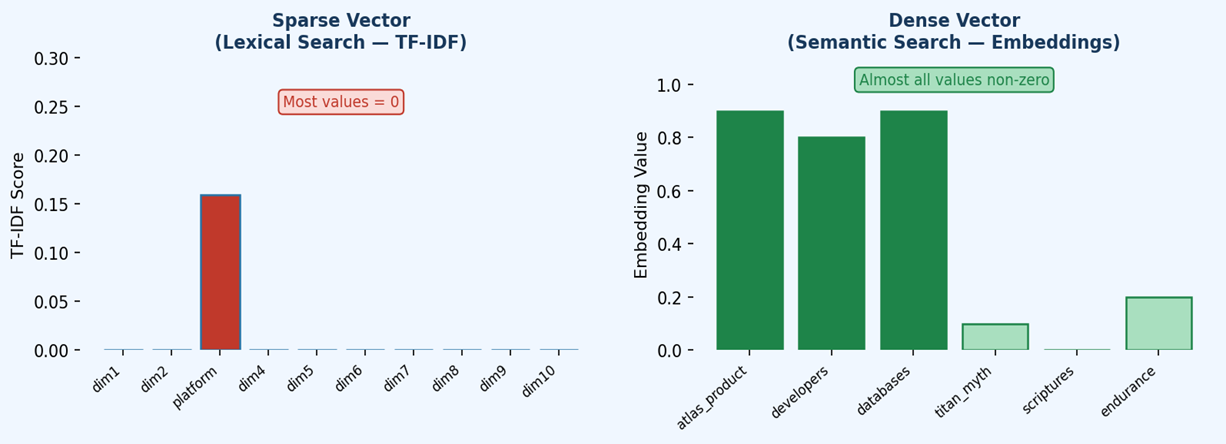
<p>• Sparse vectors — suited for text/lexical search, used in MongoDB Atlas Search.<br />
• Dense vectors — suited for semantic search, used in MongoDB Atlas Vector Search.</p>

<p><img src="/mongodb-vectorsearch/assets/sparse_dense_vectors_image_1.png" alt="alt text" /></p>

<blockquote>
  <p>Figure 1 — Sparse vectors are high-dimensional but efficient (most values are zero). Dense vectors encode rich meaning across all dimensions, with very few zero values.</p>
</blockquote>

<h3 id="11-sparse-vectors">1.1 Sparse Vectors</h3>

<p>Sparse vectors are high-dimensional representations where most dimension values are zero. Only the dimensions corresponding to words that actually appear in a document carry a non-zero value (typically a TF-IDF score). Because only non-zero values need to be stored, sparse vectors are highly memory-efficient even with vocabularies containing hundreds of thousands of terms.</p>

<p>• High-dimensional but memory-efficient — only non-zero values are stored.<br />
• Represent the presence or absence of specific terms within a document.<br />
• Best for exact keyword and lexical search scenarios.</p>

<h3 id="12-dense-vectors">1.2 Dense Vectors</h3>

<p>Dense vectors are generated by transformer-based embedding models (such as BERT or OpenAI embeddings) and encode rich contextual meaning across all their dimensions. Unlike sparse vectors, very few values are zero. They typically have thousands of dimensions and capture complex semantic relationships that go far beyond simple word matching.</p>

<p>• Thousands of dimensions, very few zero values.<br />
• Generated by transformer-based embedding models (e.g., BERT, OpenAI embeddings).<br />
• Best for semantic/conceptual search — natural language, image processing.</p>

<h3 id="2-tf-idf">2. TF-IDF</h3>

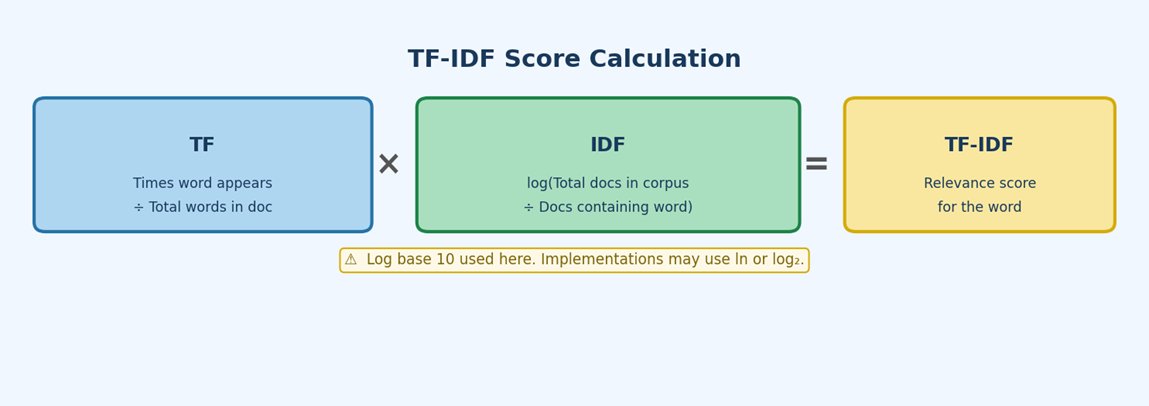
<p>TF-IDF (Term Frequency–Inverse Document Frequency) combines two measures: how frequently a word appears in a document (TF), and how unique that word is across the corpus (IDF). The resulting score reflects how important a word is to a specific document. Words common across all documents score low; words distinctive to one document score high.</p>

<blockquote>
  <p>Note: In MongoDB Atlas, BM25 is the underlying algorithm used by Atlas Search. TF-IDF is presented here as a conceptual foundation because it shares the same core intuition and is easier to demonstrate step by step.</p>
</blockquote>

<h3 id="21-formulas">2.1 Formulas</h3>

<p><img src="/mongodb-vectorsearch/assets/sparse_dense_vectors_image_2.png" alt="alt text" /></p>

<blockquote>
  <p>Figure 2 — TF-IDF formula breakdown. Note: log base 10 is used in this tutorial. Implementations may use the natural log (ln) or log base 2 — always check the library or database documentation.</p>
</blockquote>

<div class="language-text highlighter-rouge"><div class="highlight"><pre class="highlight"><code>TF  = (number of times "word" appears) / (total words in document)

IDF = log10( Total documents in corpus / Documents containing "word" )
  [Note: log base 10 used here; implementations may use ln or log2]

TF-IDF = TF × IDF
</code></pre></div></div>

<h3 id="22-worked-example">2.2 Worked Example</h3>

<p>Consider the following three-document corpus:</p>

<ul>
  <li>Doc 1 — Atlas the platform</li>
  <li>Doc 2 — Atlas the Titan</li>
  <li>Doc 3 — Atlas the mountain</li>
</ul>

<h4 id="step-1--term-frequency-tf">Step 1 — Term Frequency (TF)</h4>

<p>Each sentence has 3 words, so every word has TF = 1/3 ≈ 0.333.</p>

<table>
  <thead>
    <tr>
      <th>Word</th>
      <th style="text-align: right">Occurrences</th>
      <th style="text-align: right">Total Words</th>
      <th style="text-align: left">TF</th>
    </tr>
  </thead>
  <tbody>
    <tr>
      <td>Atlas</td>
      <td style="text-align: right">1</td>
      <td style="text-align: right">3</td>
      <td style="text-align: left">0.333</td>
    </tr>
    <tr>
      <td>the</td>
      <td style="text-align: right">1</td>
      <td style="text-align: right">3</td>
      <td style="text-align: left">0.333</td>
    </tr>
    <tr>
      <td>platform</td>
      <td style="text-align: right">1</td>
      <td style="text-align: right">3</td>
      <td style="text-align: left">0.333</td>
    </tr>
  </tbody>
</table>

<h4 id="step-2--inverse-document-frequency-idf">Step 2 — Inverse Document Frequency (IDF)</h4>

<p>“Atlas” and “the” appear in all 3 documents, so IDF = log10(3/3) = 0.<br />
 Unique words like “platform”, “Titan”, and “mountain” appear in only 1 document: IDF = log10(3/1) ≈ 0.477.</p>

<table>
  <thead>
    <tr>
      <th>Word</th>
      <th style="text-align: right">Total Docs</th>
      <th style="text-align: right">Docs with Word</th>
      <th style="text-align: right">IDF (log10)</th>
    </tr>
  </thead>
  <tbody>
    <tr>
      <td>Atlas</td>
      <td style="text-align: right">3</td>
      <td style="text-align: right">3</td>
      <td style="text-align: right">0.000</td>
    </tr>
    <tr>
      <td>the</td>
      <td style="text-align: right">3</td>
      <td style="text-align: right">3</td>
      <td style="text-align: right">0.000</td>
    </tr>
    <tr>
      <td>platform</td>
      <td style="text-align: right">3</td>
      <td style="text-align: right">1</td>
      <td style="text-align: right">0.477</td>
    </tr>
    <tr>
      <td>Titan</td>
      <td style="text-align: right">3</td>
      <td style="text-align: right">1</td>
      <td style="text-align: right">0.477</td>
    </tr>
    <tr>
      <td>mountain</td>
      <td style="text-align: right">3</td>
      <td style="text-align: right">1</td>
      <td style="text-align: right">0.477</td>
    </tr>
  </tbody>
</table>

<h4 id="step-3--tf-idf-scores">Step 3 — TF-IDF Scores</h4>

<p>Multiply TF × IDF for each word in each document.</p>

<table>
  <thead>
    <tr>
      <th style="text-align: right">Document</th>
      <th>Word</th>
      <th style="text-align: left">TF</th>
      <th style="text-align: left">IDF</th>
      <th style="text-align: left">TF‑IDF</th>
    </tr>
  </thead>
  <tbody>
    <tr>
      <td style="text-align: right">1</td>
      <td>Atlas</td>
      <td style="text-align: left">0.333</td>
      <td style="text-align: left">0.000</td>
      <td style="text-align: left">0.000</td>
    </tr>
    <tr>
      <td style="text-align: right">1</td>
      <td>the</td>
      <td style="text-align: left">0.333</td>
      <td style="text-align: left">0.000</td>
      <td style="text-align: left">0.000</td>
    </tr>
    <tr>
      <td style="text-align: right">1</td>
      <td>platform</td>
      <td style="text-align: left">0.333</td>
      <td style="text-align: left">0.477</td>
      <td style="text-align: left">0.159</td>
    </tr>
    <tr>
      <td style="text-align: right">2</td>
      <td>Atlas</td>
      <td style="text-align: left">0.333</td>
      <td style="text-align: left">0.000</td>
      <td style="text-align: left">0.000</td>
    </tr>
    <tr>
      <td style="text-align: right">2</td>
      <td>the</td>
      <td style="text-align: left">0.333</td>
      <td style="text-align: left">0.000</td>
      <td style="text-align: left">0.000</td>
    </tr>
    <tr>
      <td style="text-align: right">2</td>
      <td>Titan</td>
      <td style="text-align: left">0.333</td>
      <td style="text-align: left">0.477</td>
      <td style="text-align: left">0.159</td>
    </tr>
    <tr>
      <td style="text-align: right">3</td>
      <td>Atlas</td>
      <td style="text-align: left">0.333</td>
      <td style="text-align: left">0.000</td>
      <td style="text-align: left">0.000</td>
    </tr>
    <tr>
      <td style="text-align: right">3</td>
      <td>the</td>
      <td style="text-align: left">0.333</td>
      <td style="text-align: left">0.000</td>
      <td style="text-align: left">0.000</td>
    </tr>
    <tr>
      <td style="text-align: right">3</td>
      <td>mountain</td>
      <td style="text-align: left">0.333</td>
      <td style="text-align: left">0.477</td>
      <td style="text-align: left">0.159</td>
    </tr>
  </tbody>
</table>

<blockquote>
  <p>“Platform” in Document 1 scores TF‑IDF = 0.333 × 0.477 ≈ 0.159, while “Atlas” and “the” score 0 because they appear in every document and carry no distinguishing power.</p>
</blockquote>

<h3 id="3-sparse-vector-representation">3. Sparse Vector Representation</h3>

<p>A sparse vector represents a document as a vector in a vocabulary-sized space. Each dimension corresponds to one unique word in the corpus; its value is the TF-IDF score for that word in the document. Because most words are absent from any given document, most values are zero.</p>

<p>Vocabulary: [Atlas, the, platform, Titan, mountain]</p>

<table>
  <thead>
    <tr>
      <th style="text-align: right">Document</th>
      <th style="text-align: right">Atlas</th>
      <th style="text-align: right">the</th>
      <th style="text-align: right">platform</th>
      <th style="text-align: right">Titan</th>
      <th style="text-align: right">mountain</th>
    </tr>
  </thead>
  <tbody>
    <tr>
      <td style="text-align: right">1</td>
      <td style="text-align: right">0</td>
      <td style="text-align: right">0</td>
      <td style="text-align: right">0.159</td>
      <td style="text-align: right">0</td>
      <td style="text-align: right">0</td>
    </tr>
    <tr>
      <td style="text-align: right">2</td>
      <td style="text-align: right">0</td>
      <td style="text-align: right">0</td>
      <td style="text-align: right">0</td>
      <td style="text-align: right">0.159</td>
      <td style="text-align: right">0</td>
    </tr>
    <tr>
      <td style="text-align: right">3</td>
      <td style="text-align: right">0</td>
      <td style="text-align: right">0</td>
      <td style="text-align: right">0</td>
      <td style="text-align: right">0</td>
      <td style="text-align: right">0.159</td>
    </tr>
  </tbody>
</table>

<h3 id="4-dense-vectors--semantic-search">4. Dense Vectors &amp; Semantic Search</h3>

<p>Dense vectors encode rich contextual meaning, enabling semantic search — finding results based on meaning rather than exact keyword matches. Consider these two sentences:</p>

<p>• “Atlas is a powerful developer data platform”<br />
• “Atlas is a titan from ancient Greek scriptures and serves as a symbol of endurance”</p>

<p>Even though both sentences share the word “Atlas”, they describe completely different concepts. A dense embedding model captures this distinction by generating vectors with very different values across semantic dimensions.</p>

<h3 id="41-example-embedding-dimensions">4.1 Example Embedding Dimensions</h3>

<p>For illustration, assume an embedding model projects each sentence onto 6 semantic dimensions:</p>

<table>
  <thead>
    <tr>
      <th>Sentence</th>
      <th style="text-align: right">atlas_product</th>
      <th style="text-align: right">developers</th>
      <th style="text-align: right">databases</th>
      <th style="text-align: right">titan_myth</th>
      <th style="text-align: right">scriptures</th>
      <th style="text-align: right">endurance</th>
    </tr>
  </thead>
  <tbody>
    <tr>
      <td>Sentence 1</td>
      <td style="text-align: right">0.9</td>
      <td style="text-align: right">0.8</td>
      <td style="text-align: right">0.9</td>
      <td style="text-align: right">0.1</td>
      <td style="text-align: right">0.0</td>
      <td style="text-align: right">0.2</td>
    </tr>
    <tr>
      <td>Sentence 2</td>
      <td style="text-align: right">0.1</td>
      <td style="text-align: right">0.2</td>
      <td style="text-align: right">0.0</td>
      <td style="text-align: right">0.9</td>
      <td style="text-align: right">0.8</td>
      <td style="text-align: right">0.9</td>
    </tr>
  </tbody>
</table>

<h3 id="42-cosine-similarity">4.2 Cosine Similarity</h3>

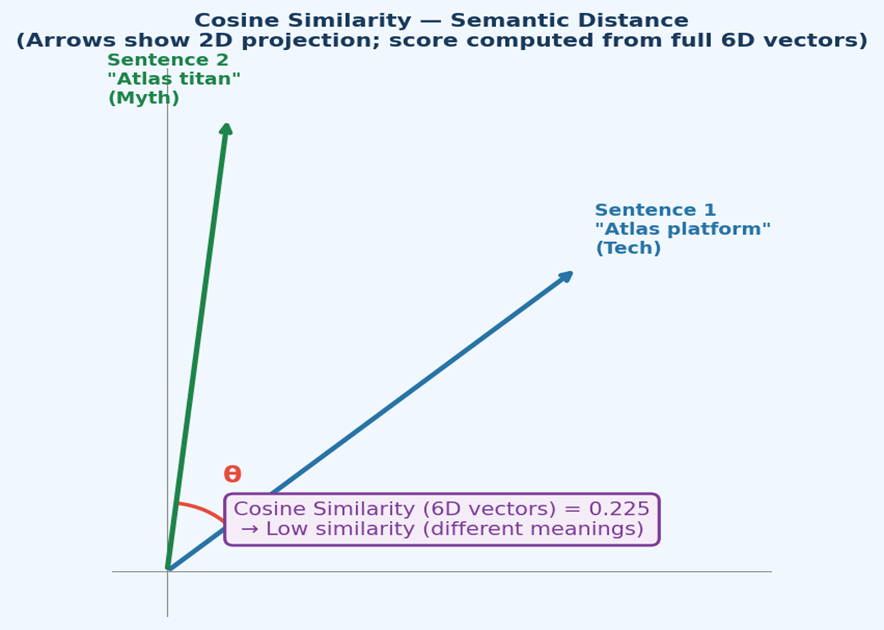
<p>Semantic search ranks documents by cosine similarity — the cosine of the angle between two vectors in the embedding space. A score of 1 means identical direction (same meaning); 0 means orthogonal (unrelated).</p>

<p><img src="/mongodb-vectorsearch/assets/sparse_dense_vectors_image_3.png" alt="alt text" /></p>

<blockquote>
  <p>Figure 3 — The two vectors point in very different directions, confirming a low cosine similarity (~0.225) despite both sentences containing “Atlas”.</p>
</blockquote>

<div class="language-text highlighter-rouge"><div class="highlight"><pre class="highlight"><code>
A = [0.9, 0.8, 0.9, 0.1, 0.0, 0.2]   (Sentence 1)
B = [0.1, 0.2, 0.0, 0.9, 0.8, 0.9]   (Sentence 2)

Dot product (A · B):
  (0.9×0.1) + (0.8×0.2) + (0.9×0.0) + (0.1×0.9) + (0.0×0.8) + (0.2×0.9)
= 0.09 + 0.16 + 0.00 + 0.09 + 0.00 + 0.18 = 0.52

Magnitude |A| = sqrt(0.81+0.64+0.81+0.01+0.00+0.04) = sqrt(2.31) ≈ 1.52
Magnitude |B| = sqrt(0.01+0.04+0.00+0.81+0.64+0.81) = sqrt(2.31) ≈ 1.52

Cosine Similarity = 0.52 / (1.52 × 1.52) = 0.52 / 2.31 ≈ 0.225
Low similarity — the sentences have very different meanings.
</code></pre></div></div>

<h3 id="5-mongodb-atlas-vector-search">5. MongoDB Atlas Vector Search</h3>

<p>Atlas Vector Search stores dense embeddings alongside documents in MongoDB. At query time, the query text is embedded using the same model, and MongoDB returns the documents whose vectors are most similar (highest cosine similarity score). This means a search for “developer tools” can match “Atlas platform” semantically, even with zero keyword overlap.</p>

<blockquote>
  <p><strong>Key point</strong>: <em>Atlas Search (BM25/sparse) is ideal for keyword precision. Atlas Vector Search (dense embeddings) is ideal for conceptual or natural-language queries. Many production applications combine both — a technique known as <strong>hybrid search</strong>.</em></p>
</blockquote>]]></content><author><name></name></author><category term="mongodb" /><category term="vector-search" /><category term="nlp" /><category term="mongodb" /><category term="vector-search" /><category term="tf-idf" /><category term="embeddings" /><summary type="html"><![CDATA[Sparse and Dense Vectors in MongoDB Atlas]]></summary></entry></feed>