Introduction to AI Agents
Artificial Intelligence (AI) agents are systems powered by Large Language Models (LLMs) that can autonomously plan, make decisions, and execute actions to achieve a specific goal. Unlike traditional chatbots that simply generate text based on training data, AI agents can interact with the outside world using tools—such as web browsers, calculators, databases, and APIs. This allows them to fetch real-time information, perform calculations, and execute complex workflows without human intervention.
What is a ReAct Agent?
ReAct stands for Reasoning and Acting. It is a powerful paradigm for building AI agents where the LLM is prompted to alternate between generating reasoning traces (thinking about what to do next) and taking actions (using a tool).
In a typical ReAct loop:
- Thought: The agent reasons about the user’s request and decides which tool to use.
- Action: The agent calls the selected tool with the appropriate inputs.
- Observation: The agent receives the output from the tool.
- The cycle repeats until the agent has enough information to provide a final Answer.
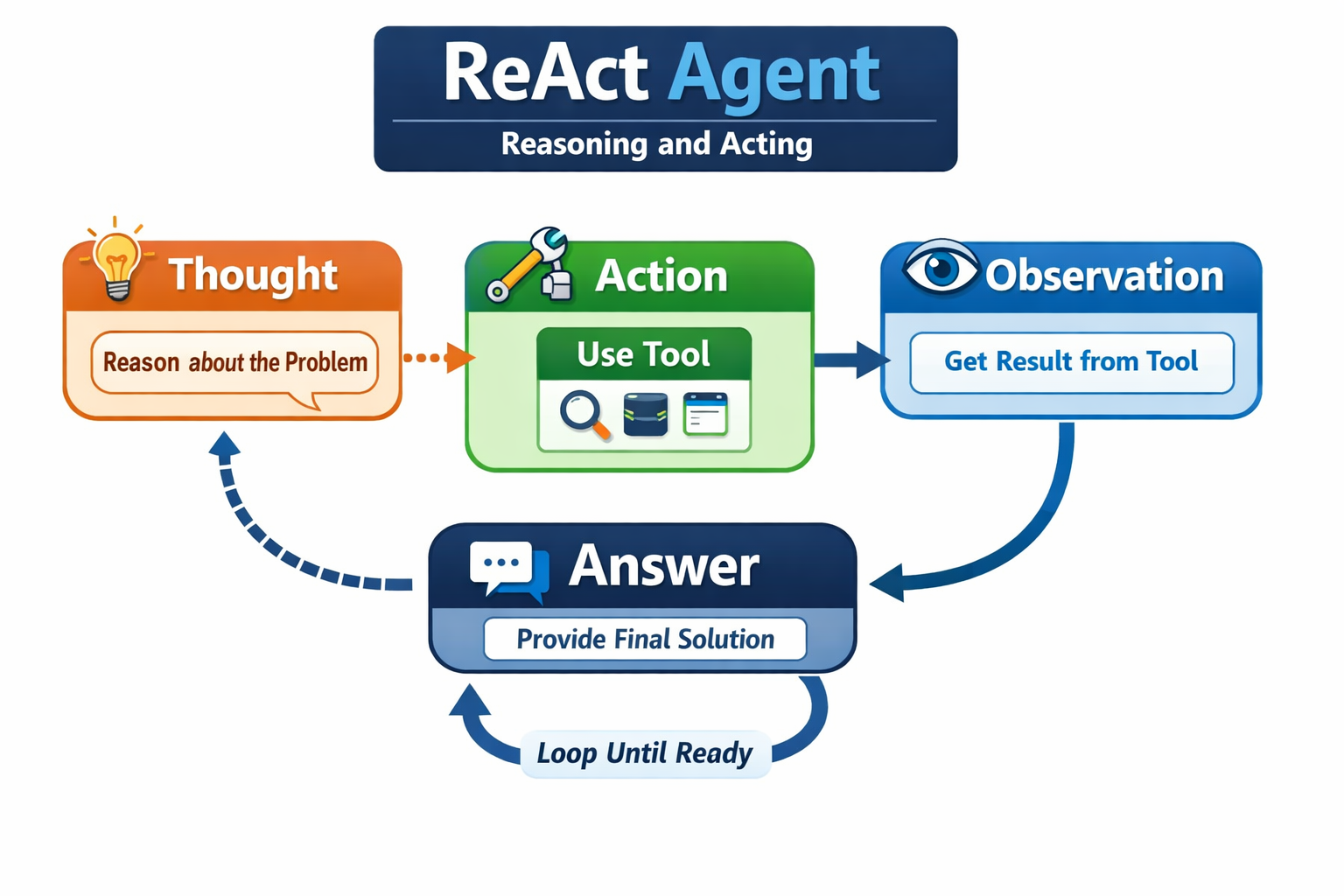
This structured approach makes ReAct agents highly capable of handling complex, multi-step problems, as they can break them down and verify facts along the way.
Summary of the Financial Analyst Agent
In this tutorial, we will build a specialized ReAct agent that acts as a “Financial Analyst”. This agent is designed to autonomously answer complex financial questions by:
- Fetching historical stock prices using the Yahoo Finance (
yfinance) library. - Searching for recent market news using the DuckDuckGo Search API.
By combining these two tools, the agent can not only tell you how a stock is performing but also reason about why it is performing that way based on current news. To ensure transparency, the agent is strictly instructed to cite its sources and restrict its answers exclusively to financial topics.
Step-by-Step Guide: Building the Financial Analyst Agent
1. Required Python Packages
Before we start coding, you’ll need to install the required Python packages. You can install them using pip:
pip install langchain langchain-openai langchain-community yfinance duckduckgo-search rich python-dotenv
2. Environment Setup
Create a .env file in your project directory and add your OpenAI API key:
OPENAI_API_KEY=your_openai_api_key_here
3. Importing Dependencies and Initializing the LLM
We start by importing the necessary libraries and defining a helper function to initialize our Language Model (LLM). We will use OpenAI’s gpt-4o for its strong reasoning capabilities.
import os
import sys
import yfinance as yf
from typing import Literal

from langchain.agents import create_agent
from langchain_openai import ChatOpenAI
from langchain_core.tools import tool
from langchain_community.tools import DuckDuckGoSearchRun
from langchain_community.utilities import DuckDuckGoSearchAPIWrapper
from rich.console import Console
from rich.panel import Panel
from rich.markdown import Markdown
from rich.prompt import Prompt
from load_env import configure_environment

def get_llm(apikey, model="gpt-4o", temperature=0):
    return ChatOpenAI(model=model, temperature=temperature, api_key=apikey)
4. Defining the Tools
Tools are the hands and eyes of our agent. We define them using the @tool decorator from LangChain. Notice how we provide detailed docstrings—the LLM reads these docstrings to understand when and how to use the tool.
Stock Price Tool:
@tool
def get_stock_price_results(ticker_symbol: str, period: Literal["1d", "5d", "1mo", "3mo", "6mo", "1y", "2y", "5y", "10y", "ytd", "max"] = "1mo"):
    """
    Fetch historical stock price data using Yahoo Finance.
    For Indian stocks, append '.NS' to the symbol (e.g., 'RELIANCE.NS' or 'TCS.NS').
    Useful for when you need to get stock prices and trends.
    """
    try:
        stock = yf.Ticker(ticker_symbol)
        history = stock.history(period=period)

        if history.empty:
            return "No data found for this ticker."

        # Return the recent closing prices as a dictionary
        return {str(k.date()): v for k, v in history['Close'].tail(5).to_dict().items()}
    except Exception as e:
        return f"Error fetching historical data: {e}"
Web Search Tool:
@tool
def get_duckduckgo_results(query: str, num_results: int = 5):
    """
    Fetch search results from DuckDuckGo using LangChain's DuckDuckGoSearchRun tool.
    Useful for when you need to answer questions about current events or general knowledge.
    """
    try:
        wrapper = DuckDuckGoSearchAPIWrapper(max_results=num_results)
        search_tool = DuckDuckGoSearchRun(api_wrapper=wrapper)
        return search_tool.invoke(query)
    except Exception as e:
        return "Failed to fetch results."

def get_tools():
    return [get_duckduckgo_results, get_stock_price_results]
5. The System Prompt
The system prompt is the brain of the agent. It defines the persona, rules, and behavioral constraints. Here, we enforce a transparency rule and restrict the agent’s domain to finance.
system_prompt = """You are an expert financial analyst assistant.
You have access to financial data tools and a websearch tool.
You should always think step-by-step and use the tools effectively to answer complex financial questions.
When a user asks about a stock, you MUST use the websearch tool to find the top 5 recent news articles about that stock.
You must then analyze those news results to reason about WHY the stock is performing the way it is, and clearly explain those reasons in your final response to the user.
TRANSPARENCY RULE: You MUST explicitly cite your sources in your final response. Clearly state which data came from "Yahoo Finance" and which insights came from the "DuckDuckGo Web Search Tool" so the user knows exactly where the information originated.
RESTRICTION: You are strictly restricted to answering questions about stock prices and the reasons for their performance. If a user asks about anything else, politely decline and remind them of your restriction.
Always use the tools to get the most up-to-date information."""
6. Assembling the Agent and User Interface
Finally, we tie everything together in the main() function. We use create_agent to assemble the LLM, tools, and system prompt. We also use the rich library to create a beautiful, formatted terminal interface for the user to chat with the agent.
def main():
    configure_environment()

    # Fix for Windows console UnicodeEncodeError
    if sys.stdout.encoding != 'utf-8':
        sys.stdout.reconfigure(encoding='utf-8')

    openai_api_key = os.getenv("OPENAI_API_KEY")
    if not openai_api_key:
        raise ValueError("OpenAI API key is not set")

    llm = get_llm(openai_api_key)
    tools = get_tools()

    # Create the ReAct agent
    agent = create_agent(model=llm, tools=tools, system_prompt=system_prompt)

    console = Console()
    welcome_text = (
        "Welcome to the **Financial Analyst Agent**!\n\n"
        "Please note: This agent is restricted to providing stock prices and analyzing the reasons for their performance.\n"
        "Type **'exit'** or **'quit'** to end the chat."
    )
    console.print(Panel(Markdown(welcome_text), title="[bold green]AI Assistant[/bold green]", expand=False))

    chat_history = []

    while True:
        try:
            console.print()
            user_input = Prompt.ask("[bold blue]You[/bold blue]")

            if user_input.lower() in ['quit', 'exit']:
                console.print("[bold red]Goodbye![/bold red]")
                break

            if not user_input.strip():
                continue

            chat_history.append(("user", user_input))

            # Invoke the agent with a loading spinner
            with console.status("[bold yellow]Agent is thinking...[/bold yellow]", spinner="dots"):
                result = agent.invoke({"messages": chat_history})

            agent_response = result["messages"][-1].content

            console.print()
            console.print(Panel(Markdown(agent_response), title="[bold green]Financial Analyst[/bold green]", expand=False))

            chat_history.append(("assistant", agent_response))

        except KeyboardInterrupt:
            console.print("\n[bold red]Goodbye![/bold red]")
            break
        except Exception as e:
            console.print(f"\n[bold red]An error occurred: {e}[/bold red]\n")

if __name__ == "__main__":
    main()
How to Test
To test the agent, run the script from your terminal:
python financial_analyst.py
Once the chat starts, try asking a question like:
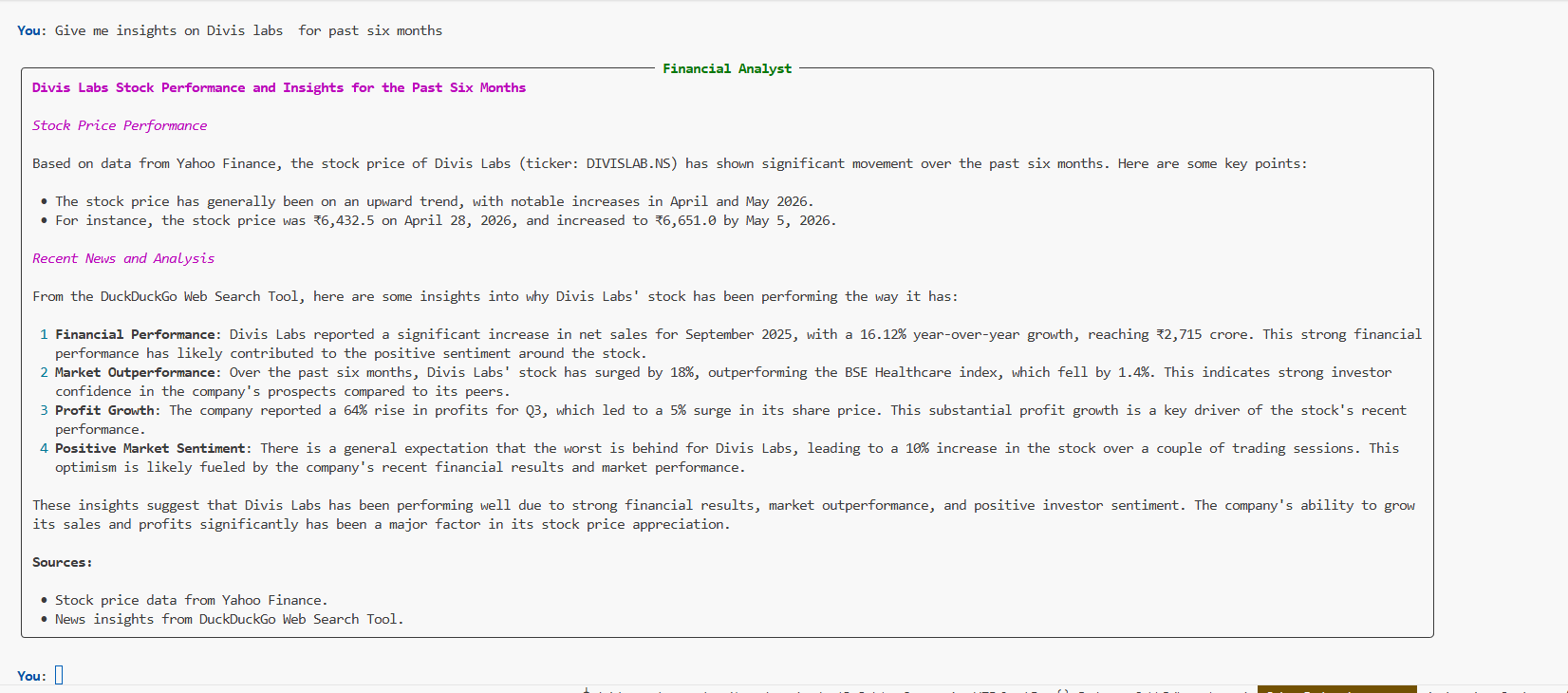
“What is the current stock price of DIVIS and why is it performing that way?”
You should see the agent “think”, fetch the stock prices from Yahoo Finance, search the web for the latest news using DuckDuckGo, and then synthesize a complete, cited answer.